Get CertaShot for $49

For Mac. Windows is in development.For Mac and Windows.

CertaShot is the fastest way to capture, timestamp, and organize screenshots into Excel.

One key per screenshot, one to export. No pasting, no resizing, no missing timestamps.

This is what it costs you today.

Screenshot. Open Excel. Paste. Resize. Realize the date and time never made it into the image, so capture it again, assuming the screen still shows what it did an hour ago. Repeat nineteen more times.

On a typical 20 screenshot session, that process takes about 11 minutes. CertaShot does the same job in about 25 seconds. One key per screenshot, one to export, done.

A screenshot without a timestamp is a screenshot you may have to take twice.

Run your own numbers.

Enter how many screenshots you take in a session and see what the manual version actually costs you.

20
The manual way
11m 20s
With CertaShot
25s
Time saved
96%

Based on the time it takes to capture, paste, resize, and label one screenshot by hand.

Two steps. That's the whole process.

Capture, export. Everything else happens automatically.

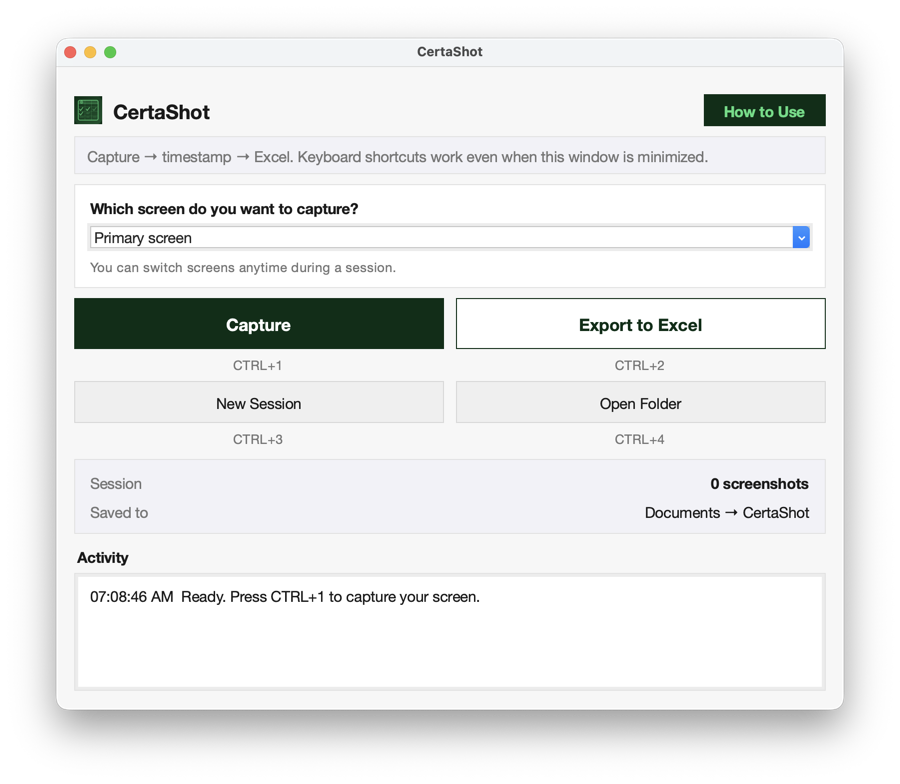
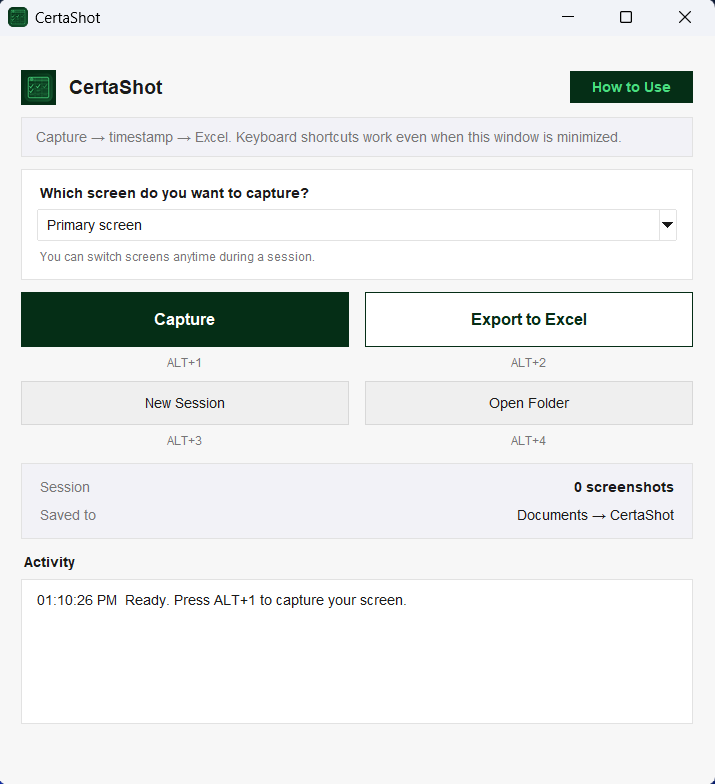
CTRL + 1Mac ALT + 1Windows

Press one key to grab your full screen, from any app. The date and time are burned in automatically.

CTRL + 2Mac ALT + 2Windows

Press one key to turn the whole session into a finished Excel workbook that automatically opens. Every screenshot is timestamped, in order, and sized consistently.

What you press, and what comes out the other side.

A real look at the app and the workbook it builds.

The CertaShot app window on Mac showing Capture and Export to Excel buttons with CTRL+1 through CTRL+4 shortcuts The CertaShot app window on Windows showing Capture and Export to Excel buttons with ALT+1 through ALT+4 shortcuts
Screenshots
Audit Log
In Excel
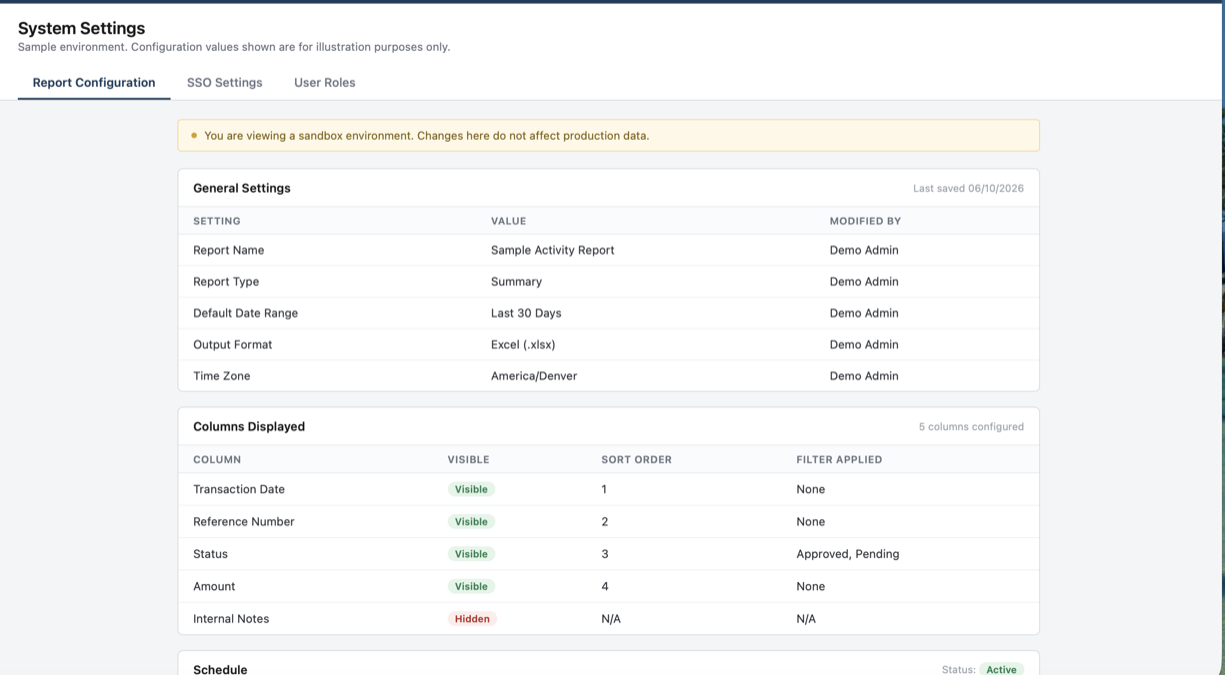
A CertaShot capture, timestamped automatically in the bottom corner 09:12:04 AM
  • 001_screenshot.png09:12:04 AM
  • 002_screenshot.png09:12:09 AM
  • 003_screenshot.png09:12:15 AM
#FilenameTimestamp
1001_screenshot.png08/30/2026 09:12:04 AM
2002_screenshot.png08/30/2026 09:12:09 AM
3003_screenshot.png08/30/2026 09:12:15 AM
CertaShot_Session_08-30-2026.xlsx
A
1
2
3
A
B
C
1
001_screenshot.png
09:12:04 AM
1
2
002_screenshot.png
09:12:09 AM
1
3
003_screenshot.png
09:12:15 AM
1
Screenshots Audit Log

// real CertaShot output: images in order, each stamped, plus a matching Audit Log row

What you get in the file.

The workbook is the product. Here is exactly what lands on your Mac.your computer.

Timestamps burned into the image

The date and time are written onto the screenshot itself at the moment of capture. Not in the filename, not in a column you have to trust. Anyone opening the file can see when it was taken.

001_screenshot_09-12-04.pngVERIFIED

Two tabs, already organized

Every export opens with a Screenshots tab holding the images in the order you took them, and an Audit Log tab listing the number, filename, timestamp, and screen for each one.

ScreenshotsAudit Log

Consistent sizing, no manual resizing

Every image is scaled the same way and placed in its own row. Nothing overlaps, nothing spills off the page, nothing needs dragging into place.

1920×1080, every time

Works from anywhere on your Macyour computer

The shortcut fires whether CertaShot is in front of you or minimized. Stay in the app you are documenting and never break your rhythm.

MinimizedCTRL+1 still worksCTRL+1 / ALT+1 still works

Pick your screen

Working across two or three displays? Choose which screen to capture from the dropdown, and change it any time during a session.

Primary screen ▾

Sessions stay separate

Start a new session and CertaShot opens a fresh folder and a fresh workbook, with the counter back at one. Yesterday's work stays exactly where you left it.

Session 1→Session 2

Lives in your menu barLives in your menu bar or system tray

Capture, export, start a new session, or open your folder from the menu bar iconmenu bar or system tray icon without hunting for a window.

// always one click away

Your screenshots never leave your Macyour computer

No accounts, no cloud, no uploads. Screenshots are written straight to your Documents folder and stay there.

0 uploads0 accounts

I'm an IT auditor. I built the tool I couldn't find.

I work as an IT Auditor, which means a large part of my job is capturing what I see on screen and putting it somewhere a reviewer can follow six months later.

It is not just my job either. Every team I work with captures screenshots for something, and the complaint is always the same. It takes forever. The date and time never made it into the image, so the whole set gets taken again. Then someone spends the rest of the afternoon pasting it all into a spreadsheet.

For years I did that the manual way. Screenshot, paste, resize, label, repeat. It was the least interesting part of the work and it took the most time.

I went looking for something that already did this. Every tool I found captured the screen and stopped there. Not one of them timestamped the image or gave me a finished file with the screenshots already organized.

So I built CertaShot. Now the workbook builds itself while I keep working, and I have not pasted a screenshot into a spreadsheet since. Neither should you.

Founder, CertaShot
IT Auditor

Launch offer

One price. Yours to keep.

CertaShot for MacCertaShot for Mac and Windows
$49.00
  • Full version of CertaShot
  • Unlimited screenshots and unlimited exports
  • Every update to the current version
  • No subscription on this launch offer
  • One license activates CertaShot on one MacOne license activates CertaShot on one Mac or PC, matching your purchase

Limited to the first 50 licenses at this price.

A Mac license works only on a Mac, and a Windows license only on a PC. Installing on Windows? Follow the install guide.

Everything stays on your Mac, no cloud uploads, no tracking.Everything stays on your computer, no cloud uploads, no tracking. 30 day money back guarantee if it's not right for you.

Less time on busywork. More time on what matters.

No. CertaShot builds the workbook itself. You can open the file in Excel, Numbers, or Google Sheets.

No. CertaShot builds the workbook itself. You can open the file in Excel or Google Sheets, or in Numbers on a Mac.

Any Mac with Apple Silicon (M1 or later) running macOS 13 Ventura or later. CertaShot does not run on older Intel Macs. To check yours, open the Apple menu and choose About This Mac. The Chip line should say Apple M1 or later.

On macOS 15 and later, the first capture shows Apple's standard prompt: "CertaShot is requesting to bypass the system private window picker and directly access your screen and audio." The audio part is Apple's generic wording. CertaShot only takes still screenshots and never records audio.

64-bit Windows 10 and Windows 11. To check yours, open Settings, then System, then About. System type under Device specifications should say 64-bit, and the Windows specifications section shows the edition and version.

Not yet. CertaShot is a Mac app today and Windows is in development. If you are on Windows, hold off until it ships.

Two tabs. The Screenshots tab holds every image in the order you captured it, sized consistently. The Audit Log tab lists the number, filename, timestamp, and screen for each one.

No. There are no accounts, no cloud storage, and no tracking. Your screenshots are written to your Mac and stay on your Mac.

No. There are no accounts, no cloud storage, and no tracking. Your screenshots are written to your computer and stay there.

Into a CertaShot folder inside your Documents folder. Each session gets its own timestamped folder holding the images and the workbook.

Yes. Choose the screen you want from the dropdown in the app, and switch to a different one whenever you need to during a session.

Start a new session. CertaShot creates a new folder and a new workbook and resets the counter. Everything from the previous session stays saved.

No. There is a 30 day money back guarantee instead. Buy it, use it on real work, and if it is not right for you, email hello@certashot.com within 30 days of purchase for a full refund, no questions asked.

No. $49 is a launch offer limited to the first 50 licenses. The price goes up after that.

One license activates CertaShot on one Mac. If you replace your machine, email support@certashot.com and I will move your license over.

One license activates CertaShot on one computer. A Mac license works only on a Mac, and a Windows license only on a PC. If you replace your machine, email support@certashot.com and I will move your license over.

You get a download link and a license key by email. Install the app, enter the key once, and you are ready to capture.

Yes. This is normal for a small, newly released app. Even signed software sees it until enough people have downloaded and run it. Click "More info," then "Run anyway" to continue. You can also check that the publisher listed is Runella LLC to confirm it's genuinely CertaShot. The install guide shows each step with pictures.